# Status command to find LTE Operating Mode & Cellular IoT (CIOT) operating mode in use?
**URL:** https://mangoh.discourse.group/t/status-command-to-find-lte-operating-mode-cellular-iot-ciot-operating-mode-in-use/9294
**Category:** mangOH Red
**Created:** [June 7, 2021, 6:41am UTC](https://mangoh.discourse.group/t/status-command-to-find-lte-operating-mode-cellular-iot-ciot-operating-mode-in-use/9294 "2021-06-07T06:41:05Z")
**Posts on this page:** 4
**Page:** 1
### Author:  [@rickvanderzwet](https://mangoh.discourse.group/u/rickvanderzwet)
#### Post date: [June 7, 2021, 6:41am UTC](https://mangoh.discourse.group/t/status-command-to-find-lte-operating-mode-cellular-iot-ciot-operating-mode-in-use/9294/1 "2021-06-07T06:41:05Z")
I am using a WP7702 module which I try to connect to an LTE-M1 network. The module is fully compliant with 3GPP Release 13 thus I [expect](https://en.wikipedia.org/wiki/LTE-M) to see a device receive bandwidth of 1.4MHz, how-ever when looking at `AT!GSTATUS?` is shows `LTE bw: 10 MHz`, which I do believe is not LTE-M1, but LTE-WB instead.
I used `ATSELCIOT=6` to ensure `LTE-WB` is disabled, but have no way of knowing if this is actually enforced. I have not found a status command which give clues in the actual LTE operating mode and Cellular IoT (CIOT) operating mode in use.
```auto
root@swi-mdm9x28-wp:~# microcom /dev/ttyAT
AT!GSTATUS?
!GSTATUS:
Current Time: 826 Temperature: 33
Modem Mitigate Level: 0 ModemProc Mitigate Level: 0
Reset Counter: 1 Mode: ONLINE
System mode: LTE PS state: Attached
IMS reg state: UNKNOWN IMS mode: Not Support
IMS Srv State: UNKNOWN SMS,UNKNOWN VoIP
LTE band: B20 LTE bw: 10 MHz
LTE Rx chan: 6400 LTE Tx chan: 24400
LTE CA state: INACTIVE
EMM state: Registered Normal Service
RRC state: RRC Idle
PCC RxM RSSI: -62 RSRP (dBm): -89
PCC RxD RSSI: -62 RSRP (dBm): -140
Tx Power: -- TAC: F489 (62601)
RSRQ (dB): -9 Cell ID: 007CF70B (8189707)
SINR (dB): 20.0
OK
AT!GETBAND?
!GETBAND: LTE B20
OK
AT!SELCIOT?
Current Operating Mode: 0x6
Supported Operating Modes:
LTE WB: 0x01
LTE M1: 0x02
LTE NB1: 0x04
OK
```
```auto
root@swi-mdm9x28-wp:~# cm info
Device: WP7702
IMEI: 352653090108903
IMEISV: 6
FSN: VU810385650910
Firmware Version: SWI9X06Y_02.36.06.00 63d944 jenkins 2020/12/10 19:12:28
Bootloader Version: SWI9X06Y_02.36.06.00 63d944 jenkins 2020/12/10 19:12:28
MCU Version: 002.015
PRI Part Number (PN): 9907365
PRI Revision: 001.004
Carrier PRI Name: GENERIC
Carrier PRI Revision: 001.071_001
SKU: 1103530
Last Reset Cause: Power Down
Resets Count: Expected: 10081 Unexpected: 1
```
```auto
root@swi-mdm9x28-wp:~# cm radio
Power: ON
Current Network Operator: KPN
Current RAT: LTE network (LE_MRC_RAT_LTE)
Status: Registered, home network (LE_MRC_REG_HOME)
Signal: Very strong signal strength (5)
PS: Packet Switched Registered, home network (LE_MRC_REG_HOME)
```
```auto
root@swi-mdm9x28-wp:~# cm data
Index: 1
APN: m2mc.webtrial
PDP Type: IPV4
Connected: yes
Interface: rmnet_data0
Family[IPv4]: inet
IP[IPv4]: 100.126.108.176
Gateway[IPv4]: 100.126.108.177
Dns1[IPv4]: 194.151.228.34
Dns2[IPv4]: 194.151.228.18
```
Does anybody know how-to reveal the LTE operating mode and Cellular IoT (CIOT) operating mode which is currently in use?
---
### Author:  [@jyijyi](https://mangoh.discourse.group/u/jyijyi)
#### Post date: [June 7, 2021, 7:23am UTC](https://mangoh.discourse.group/t/status-command-to-find-lte-operating-mode-cellular-iot-ciot-operating-mode-in-use/9294/2 "2021-06-07T07:23:14Z")
you can disable CAT-M1 network in AT!SELCIOT and see what happens.
Here is my module registered with CAT M1 network:
```auto
root@fx30:~# microcom /dev/ttyAT
at!gstatus?
!GSTATUS:
Current Time: 81 Temperature: 40
Modem Mitigate Level: 0 ModemProc Mitigate Level: 0
Reset Counter: 6299715 Mode: ONLINE
System mode: LTE PS state: Attached
IMS reg state: UNKNOWN IMS mode: Not Support
IMS Srv State: UNKNOWN SMS,UNKNOWN VoIP
LTE band: B28 LTE bw: 5 MHz
LTE Rx chan: 9435 LTE Tx chan: 27435
LTE CA state: INACTIVE
EMM state: Registered Normal Service
RRC state: RRC Connected
PCC RxM RSSI: -78 RSRP (dBm): -95
PCC RxD RSSI: 0 RSRP (dBm): 0
Tx Power: 10 TAC: 0001 (1)
RSRQ (dB): -3 Cell ID: 01A2D001 (27447297)
SINR (dB): 15.4
OK
at!selciot?
Current Operating Mode: 0x6
Supported Operating Modes:
LTE WB: 0x01
LTE M1: 0x02
LTE NB1: 0x04
OK
```
---
### Author:  [@rickvanderzwet](https://mangoh.discourse.group/u/rickvanderzwet)
#### Post date: [June 7, 2021, 9:20am UTC](https://mangoh.discourse.group/t/status-command-to-find-lte-operating-mode-cellular-iot-ciot-operating-mode-in-use/9294/3 "2021-06-07T09:20:37Z")
> [@jyijyi](#):
>
> you can disable CAT-M1 network in AT!SELCIOT and see what happens.
Thanks for the suggestion, I have disabled CAT-M1 `AT!SELCIOT=1` and this results in no connection after waiting for 10 minutes. So yes, the connection is LTE-M1 based.
I am still confused on the reported bandwidth how-ever `LTE bw: 5 MHz`, especially since `eMTC LTE Cat M1 (3GPP Release 13)` seems to support a bandwidth of 1.4 MHz exclusively, where-as `LC-LTE/MTCe LTE Cat 0 (3GPP Release 12)` seems to support a bandwidth range of 1.4–20 MHz.
How should I read this value?
---
### Author:  [@jyijyi](https://mangoh.discourse.group/u/jyijyi)
#### Post date: [June 7, 2021, 9:30am UTC](https://mangoh.discourse.group/t/status-command-to-find-lte-operating-mode-cellular-iot-ciot-operating-mode-in-use/9294/4 "2021-06-07T09:30:43Z")
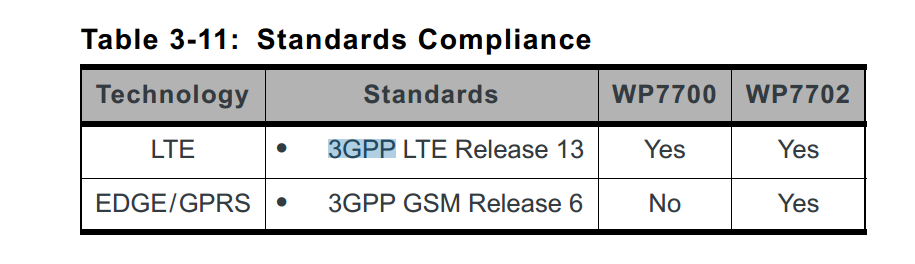
The product technical specification says it supports 3GPP LTE release 13: